
What you get:
– 1-month CapCut Pro access
– Automatic delivery on the order confirmation page and by email
– Compatible with PC, iOS, and Android
– Region: Global
– Support: Telegram & live chat
How it works
1. Complete your order securely.
2. View your delivery details on the order confirmation page and in your email.
3. 3. On mobile, sign in using the email address provided. To sign in on PC, first sign in on your mobile device, then scan the QR code displayed on the PC screen.
CapCut Pro Login Guide
Mobile Login
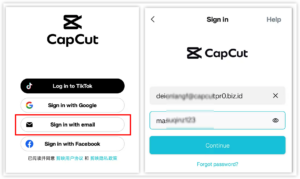
1. Open the CapCut app on your mobile device.
2. Tap “Sign in”.
3. Select “Sign in with email”.
4. Enter the email address and password provided with your order.
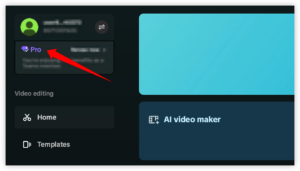
5. Complete the sign-in process and check that your Pro access is active.
Desktop Login
1. First, sign in to CapCut on your mobile device using the email details provided.
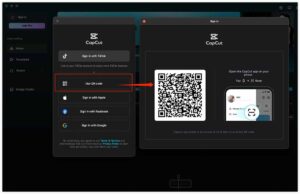
2. Open CapCut on your PC and click “Sign in”.
3. Select “Use QR code”.
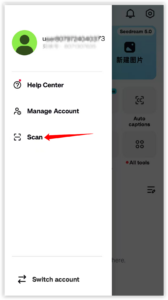
4. In the CapCut mobile app, open the scan function and scan the QR code shown on your PC.
5. Your PC will sign in automatically after the QR code is confirmed.
Reviews
There are no reviews yet.